How to Use the Wine Grapes Direct Winemaking Calculator

A Practical Guide to Brix, pH, Style & Flavor Balance
Making serious wine at home isn’t about chasing a number.
It’s about understanding what the numbers mean for structure, stability, and — most importantly — flavor.
The Wine Grapes Direct Winemaking Calculator was built to help you:
Adjust Brix intelligently
Estimate tartaric additions safely
Understand pH response variability
Avoid overshooting your target
Make style-appropriate decisions
This is not a “plug in a number and obey it” tool.
It’s a decision framework.
PART 1 — How to Use the Calculator (Step-by-Step)

Step 1: Enter Your Batch Information
You can enter:
Number of pails
Or total volume
If you’re working with must (not finished juice), select a realistic projected liquid yield (typically 60–70%).
Acidity math is based on liquid volume, not total must volume. That matters.
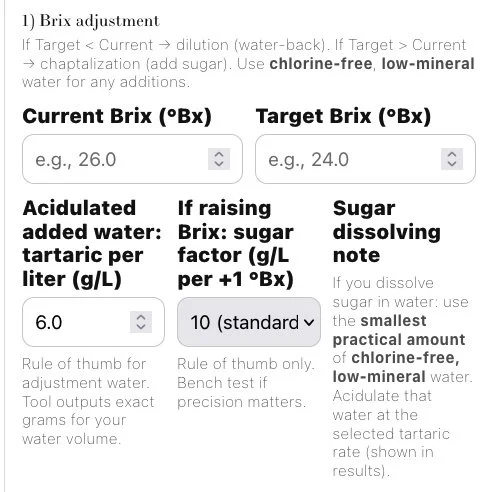
Step 2: Adjusting Brix (If Needed)
Enter:
Current Brix
Target Brix
If lowering Brix (water-back), the calculator shows how much water to add.
If raising Brix, it estimates sugar additions using standard winemaking ranges.
This gets you into a clean fermentation zone before you even think about acid..
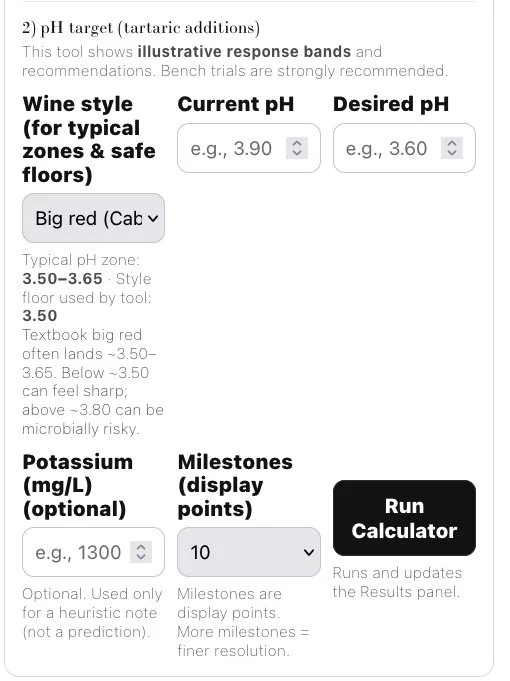
Step 3: Adjusting pH with Style in Mind
This is where the calculator becomes powerful.
You enter:
Current pH
Desired pH
Wine style
The tool then calculates additions using three response bands and gives you:
Conservative Start
Balanced One-Shot
Adaptive Bench Workflow
Why the Calculator Shows Three Response Types
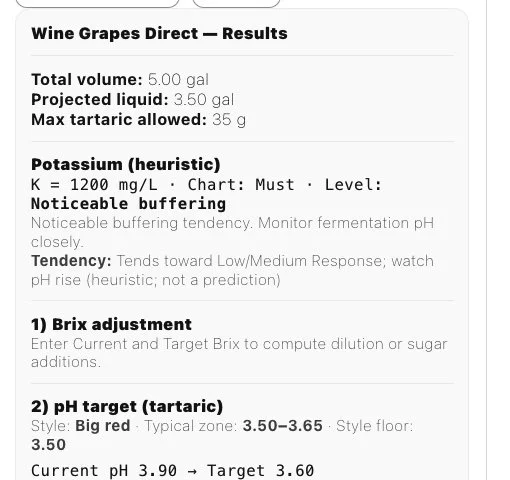
Because pH does not drop in a straight line.
Must buffering, potassium levels, tartrate precipitation, and fermentation dynamics all affect how much pH will fall per gram of tartaric added.
The calculator shows:
Low Response (high buffering)
Acid has less impact. You may need more grams to move pH.
Medium Response
Most common real-world behavior.
High Response (low buffering)
Acid drops pH aggressively. This is where overshooting happens.
The calculator builds guardrails around the high response scenario to protect you from accidentally pushing the wine too low.
Understanding Style Floors
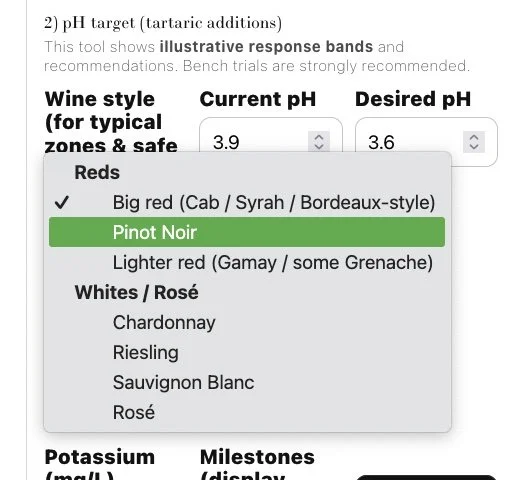
Each wine style has a typical pH range and a “floor.”
For example:
• Big reds often land 3.50–3.65
• Pinot Noir may live 3.45–3.60
• Chardonnay commonly 3.20–3.40
But here’s the key:
Those are guidelines — not commandments.
The calculator uses a style floor to prevent extreme overshooting.
It does not force you into textbook numbers.
The Truth About Wines in the 3.7s
Some excellent wines sit in the 3.70–3.75 range.
Why?
Because that’s where the flavor was.
You may have:
• Beautiful tannin texture
• Balanced mouthfeel
• Integrated oak
• Round fruit expression
And driving it down to 3.55 might make it technically “safer” — but sensorially worse.
The calculator respects that reality.
It allows you to see:
• What happens if you stop early
• What happens if you push lower
• What the structural trade-offs look like
Numbers inform.
Flavor decides.
The Three Recommendations Explained
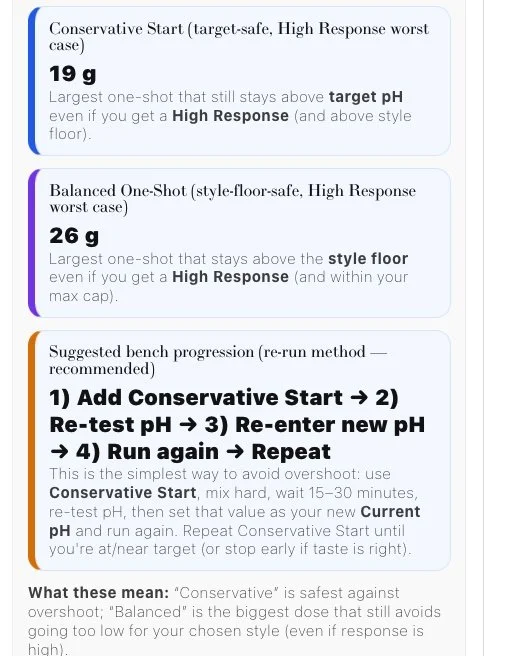
1️⃣ Conservative Start
Safest addition that won’t overshoot even under high-response conditions.
Best if you’re nervous or working with unfamiliar fruit.
2️⃣ Balanced One-Shot
Largest safe addition that stays within stylistic guardrails.
Good when you understand your fruit and want efficiency.
3️⃣ Bench Workflow (Recommended for Most Winemakers)
Add → Mix → Wait → Re-test → Re-enter → Run Again
This is the professional approach.
Start with Conservative Start.
Mix thoroughly.
Wait 15–30 minutes.
Re-test pH.
Enter your new pH as the Current pH.
Run the calculator again.
Repeat until you reach your desired balance.
This method adapts to your wine’s real response instead of relying on prediction alone
Flavor Is the Final Authority
pH affects:
Microbial stability
SO₂ effectiveness
Color stability
Tannin structure
But flavor matters more than hitting an arbitrary decimal.
If your wine tastes balanced at 3.72, forcing it to 3.58 may not improve it.
The calculator helps you see the structural implications — but it never replaces tasting.

Who This Calculator Is Built For
Home winemakers working with frozen must
Small-batch producers
Winemakers adjusting Cabernet, Pinot, Rhône blends, Chardonnay, or Rosé
Anyone asking:
“How much tartaric acid should I add to lower pH?”
What This Tool Really Does
It reduces the two biggest mistakes in home winemaking:
Adding too much tartaric at once
Blindly chasing textbook numbers without tasting
It gives you math, structure, and guardrails.
You still bring judgment.
Final Thought
Winemaking is balance.
The calculator gives you:
Safe ranges
Realistic response models
Style-aware guardrails
But the final decision should always come from the glass.
Because great wine isn’t made at 3.60.
It’s made where structure and flavor meet.